Valore’s styling assistant asks about the shopping occasion before presenting candidates in conversation. Try-on previews then offer another way to see garments, while details return to color and size. The useful sequence is expressing needs, seeing candidates, viewing previews, and choosing specifications. Each stage has an information task; their connections make recommendations purchasable choices.
Key takeaways
- Occasion choices ease the opening conversation, and cards turn recommendations into candidates with names and prices.
- Photo upload, processing, and results have separate visible states.
- Details define purchase conditions, with names and materials needing consistency with recommendation cards.
The conversation retains ordinary product information
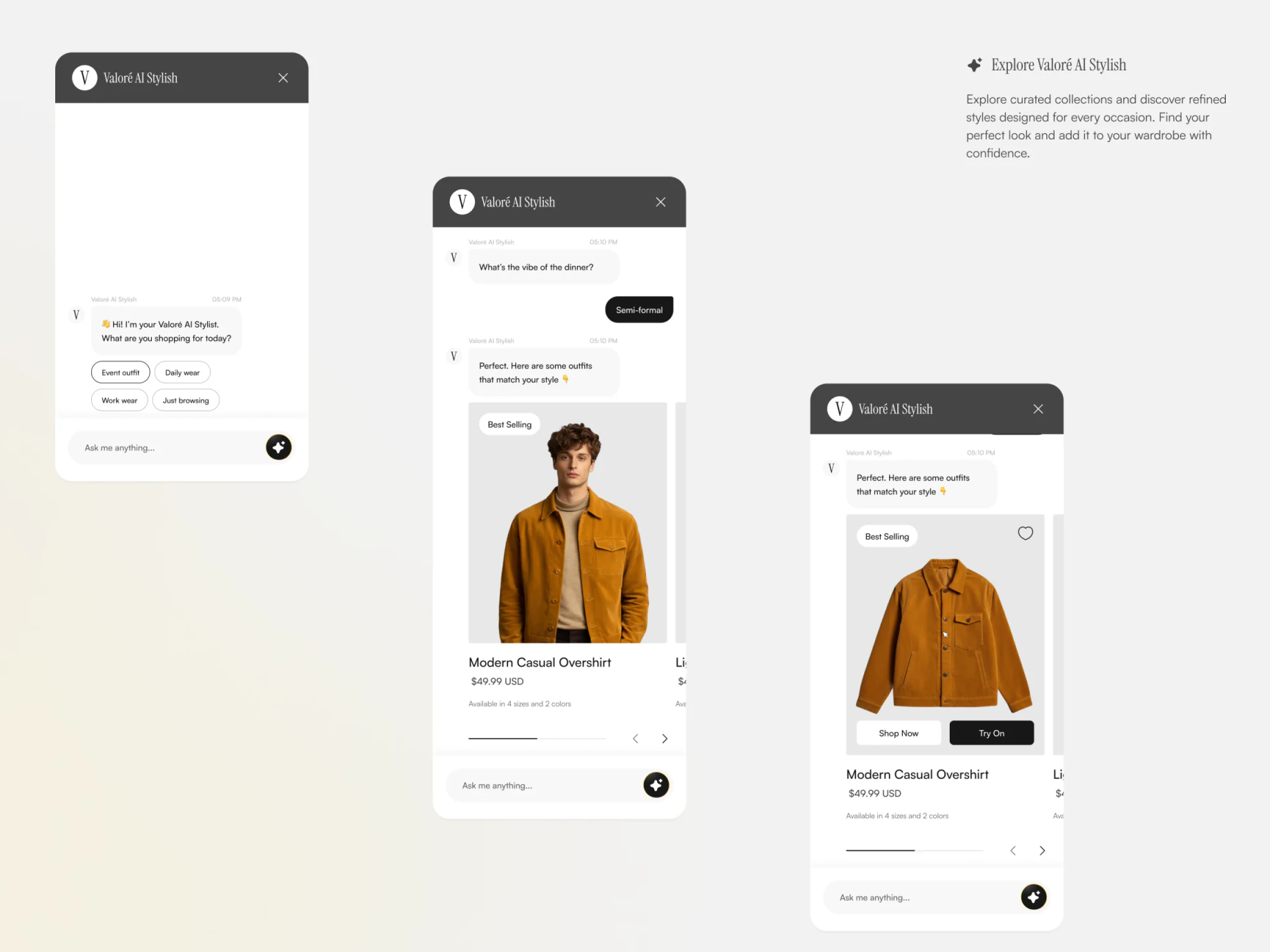
The assistant starts with Event outfit, Daily wear, Work wear, and Just browsing, while retaining Ask me anything. Choices help people without a precise description begin, and free input permits more specific needs. A later state asks about dinner atmosphere; the Semi-formal answer precedes the product card.
A large outfit photograph introduces Modern Casual Overshirt, 49.99 USD, four sizes, and two colors. Conversational language explains, while ordinary product information gives an object to check and compare. Recommendations remain connected to ecommerce information structures.
Another card replaces the portrait with the garment alone and places Shop Now beside Try On below, with try-on on black. Buying and previewing have explicit names for different intentions. The black emphasis may draw attention toward preview, so name, price, and option counts should stay stable across views.
Upload and waiting use separate containers
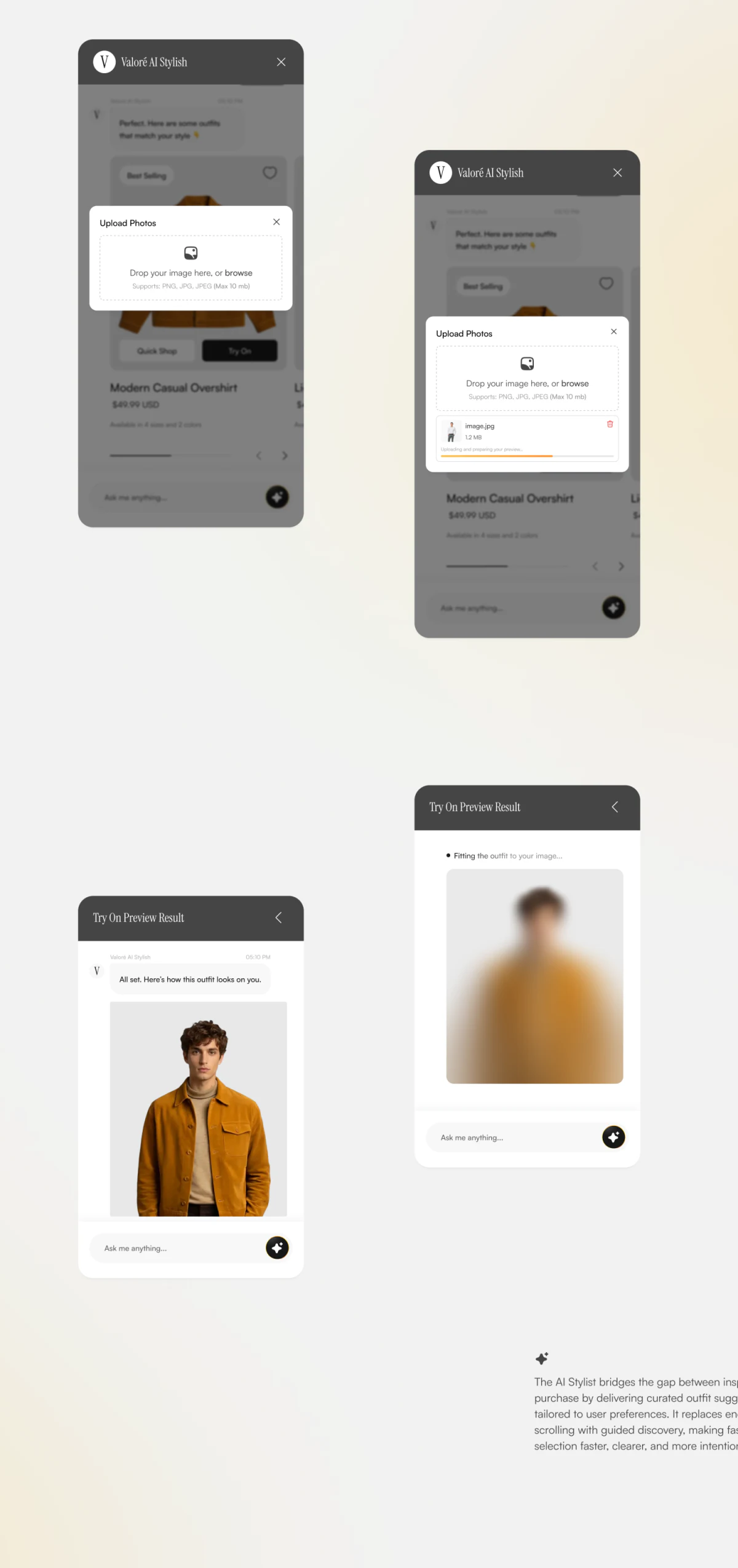
Upload Photos overlays the conversation with a dashed drag-or-browse area and PNG, JPG, JPEG, and 10 mb limits below. Another state adds thumbnail, filename, 1.2 MB, and an orange progress line, with deletion on the right. Requirements and current file stay together so users can identify what they provided.
Try On Preview Result shows processing through a blurred person and Fitting the outfit to your image, then a clear person for completion. Upload progress and generation waiting occupy separate views rather than one blank image. Actual flows also need retry, photo replacement, and return after cancellation.
A preview can suggest styling but supplies no evidence here of real fit or size accuracy. Photo use, retention, and deletion are not explained in these states. Those explanations belong before upload so users understand purpose when providing an image.
Specifications turn a styling impression into a choice
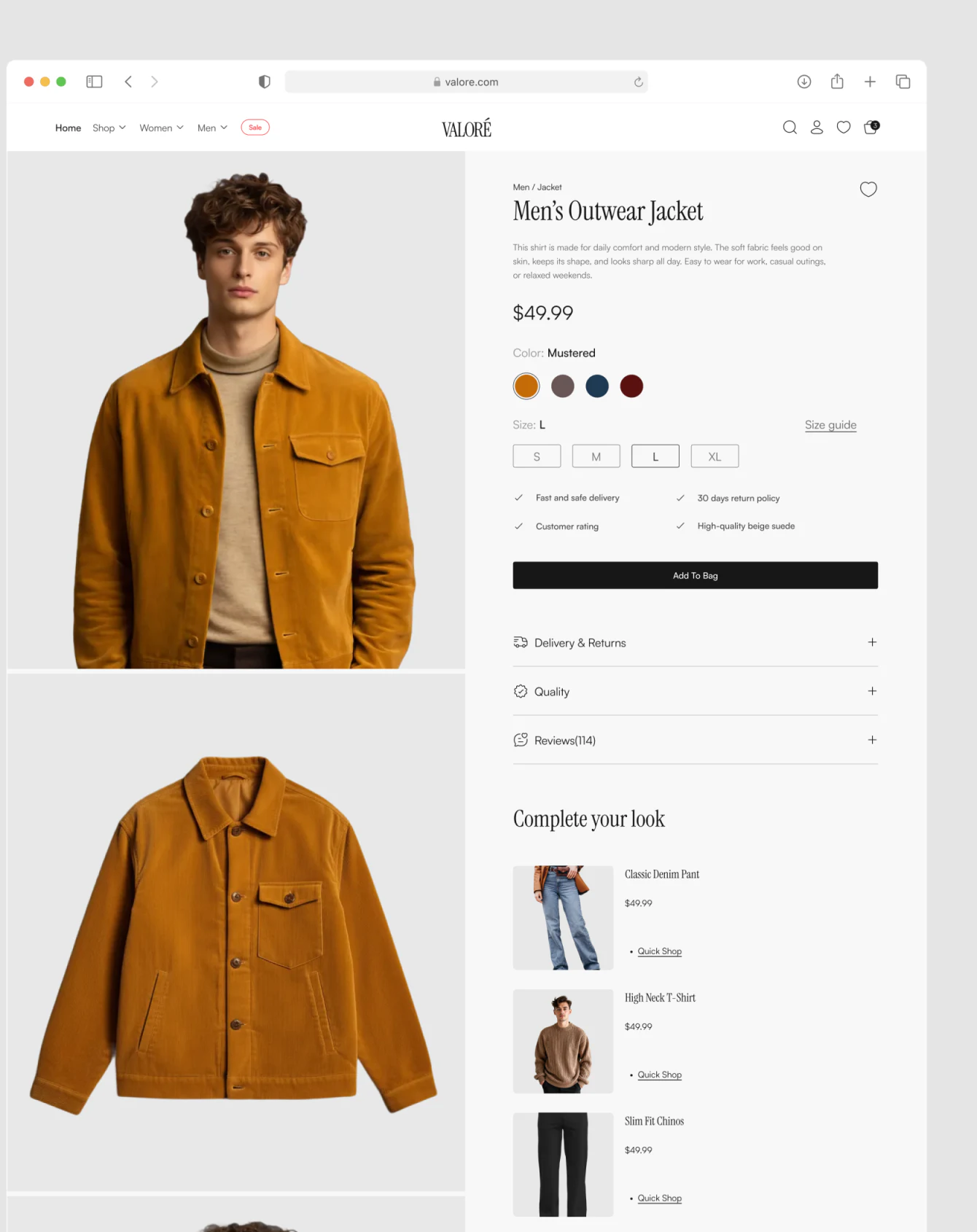
Product details alternate model and garment images on the left, with name, price, color dots, and S to XL sizes on the right. L has an emphasized border, Size guide shares the row, and Add To Bag fills a separate black button. Photographs explain appearance while colors and sizes define purchases.
Copy needs checking: the recommendation says Modern Casual Overshirt, details say Men’s Outwear Jacket, the description uses This shirt, and benefits include High-quality beige suede. Images show a mustard-toned garment, with an irregular color name. These differences do not necessarily prove different products but can raise identity questions. Align name, category, color, and material before connecting preview and bag addition.
Delivery & Returns, Quality, and Reviews use collapsible rows below, with Complete your look listing complementary products. These support reading after the main choice and call for a return position to the current candidate, avoiding a restart whenever questions are added.
Frequently asked questions
Can a try-on preview replace size selection?
These images do not support that conclusion. Previews show styling, while details still explicitly select size and color. Both should retain product identity and current options.
Design review checklist
- Use consistent product information across dialogue choices, cards, and details.
- Check upload, processing, failure, and replacement separately, with photo-use explanations.
- Retain candidates and options on return from preview, with a clear specification confirmation entry.
Connect recommendations to explicit product choices
For a styling assistant, organize each stage’s object, input, and return position before conversational tone and preview visuals.
JVDS Design Studio provides UI/UX design, website design, and development services to organize shopping flows and interface states.
 Link copied