Why Does Data Export Need More Than a Download Button? Separate Generation From Downloading
Data export has at least two results: the system generates a file, and users can obtain and open it. If generation takes time after clicking Download, explain task acceptance, the dataset used, readiness, and where results can be recovered after leaving.
Exports support checking, reporting, or cross-system work, where wrong scope harms tasks more than button appearance. Define filters, selections, and permissions before task states. A visible page need not be the exported page, and download icons cannot implicitly convey all rules.
Before Exporting, Identify Objects and Fields
Current pages, selected records, and filtered results are different sets. Offer options matching capabilities and make important scope understandable before acting. “Export all” must specify filtered results or currently permitted data.
Product staff confirm how generation adopts filters. Fixed creation-time scopes record those conditions; later reads of changed data also need definitions. Users need no internal implementation details, but cannot expect click-time results and receive another scope.
Clarify fields too. Hidden list columns may still appear in exports, and visible columns may not all be exportable. Check viewing and exporting permissions separately by business rules and display available choices accurately; a button's presence does not grant every field.
For different uses, such as checking lists and summary reports, provide accurate names or template choices and key differences. Unfamiliar format options cannot replace purpose explanations, nor should ordinary users interpret every technical parameter.
Scope summaries can record object sets, adopted conditions, fields or templates, and generation-time rules for confirmation and later task discovery. Descriptions must match files rather than merely copying list titles.

After Clicking, Explain Task Creation Without Premature File Readiness
Fast immediate generation can use brief feedback; lengthy tasks need verifiable identity and stage. Show generation and whether leaving is allowed so repeated clicks do not create multiple tasks.
Acceptance means the system starts processing conditions, not completed export. Reliable progress can show actual processing scope; otherwise state stages rather than invent growing percentages for activity.
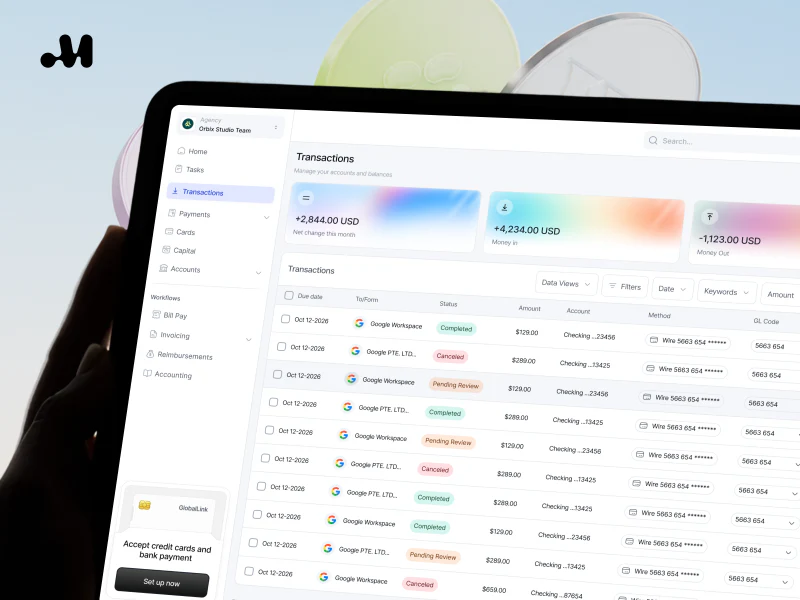
Task lists can retain summaries, start times, states, and result entries so users distinguish multiple exports beyond rows of identical buttons. Task centers depend on scale; a stable result entry can serve a few tasks.
Define whether repeated clicks view existing tasks or create new exports. Implementers jointly confirm duplicate rules and interfaces explain status. Disabled buttons alone cannot replace the relationship between existing tasks and discoverable results.
Continued generation after leaving depends on actual capability. Do not permit closing while requiring the page to stay open. If leaving is unsupported, explain limits and suitable recovery without promising background processing.
Make Retrieval Recognizable After Files Are Ready
Ready status should identify the result, type, and necessary generation time. Names distinguish scopes instead of unrelated strings. Link summaries with file identity without packing private information into filenames. See Why are SaaS backend tables getting more and more difficult to use as they are made? The real problem with the data table is not "too much information", but that the tasks have no priority for related checks.
Download buttons indicate availability, not successful saving and opening. Environments may preview files or show save dialogs; describe actions accurately. Recorded downloads do not establish reading or completed analysis.
Results needing later access should remain discoverable. A link present only in a few-second message fails long-task retrieval needs. Connect task entries and completion notices, with notices never the sole result location.
Save results with their scope for checking. Summary-only files should explain definitions; multi-file tasks should name purposes and readiness for each. One available file cannot declare an entire combined result complete.

Give Accurate Next Steps for Failures, Expiry, and Permission Changes
Generation failures should identify the file-production stage, any usable result, and regeneration or condition-check paths. Retain conditions and summaries where possible instead of forcing full reconfiguration. Error explanations should support actions rather than merely say “later.”
After download failure, an existing file should first offer retrieval again instead of regenerating all data. Separating production and retrieval places retries correctly and identifies finished and unfinished work.
If files expire, state validity on creation or readiness instead of surprising users at clicking. Actual data and product arrangements determine duration, not a uniform design assumption. Explain whether regeneration uses current data so users do not expect the old time-point file.
For changed permissions, define existing-file retrieval rules and implement real server-side controls. Explain unavailable retrieval and necessary contacts; hiding buttons cannot leave addresses unconditionally accessible. Business and security arrangements determine permission timing without one universal policy here.
Cancellation also needs boundaries. Stopping generation differs from deleting finished files. Confirm availability and handling of completed portions against implementation. Accurate cancelled states prevent paused progress being mistaken for withdrawn tasks.
Open Files to Verify Export Scope in Practice
Use recognizable constructed test records rather than private client data. Set explicit filters, then check objects, fields, and count relationships in exports. Correct summaries with files containing other scopes still fail expectations.
Check that dates, numbers, and text preserve business meaning. Missing units or reformatted identifiers can affect analysis; implementers verify format behavior. Design specifies meanings requiring preservation rather than assuming identical software behavior.
If lists change during generation, check agreed time rules. Creation-time files should match that scope; later-data files need their actual basis explained. “Latest data” cannot conceal undefined timing differences. See How to Design Data Import: Templates, Validation, Progress, and Failure Recovery for related checks.
Acceptance Covers Waiting, Leaving, Retrieval, and Recovery
Prepare small and large scopes, empty results, generation and retrieval failures, leave-and-return, and expired files. Record scopes, expected states, and next steps, then inspect interfaces and files. Testing asks whether results can be fully retrieved, not merely whether progress runs.
With multiple tasks, verify correct-result discovery. Different roles should have exportable fields and retrievable files checked against confirmed scope. Notices, task lists, and file identity must correspond without contradictory states at different entries.
Completion means understandable scope, separate generation and readiness, accurate leaving limits, stage-specific retries, and contents matching conditions. The download button can be simple if its underlying states let users use files for subsequent work.

Frequently Asked Questions
Does a List Showing Twenty Rows Necessarily Export Twenty Rows?
No. State whether scope is the page, selected objects, or filtered results and ensure files follow the rule rather than requiring users to infer it.
Can Finished Generation Be Shown as User Downloaded?
No. Readiness, download actions, and successful opening are different facts. Name states according to confirmable results.
Must Download Failure Regenerate the File?
Check availability first. Existing files can retry retrieval; failed generation uses regeneration. One retry button should not confuse these actions.
Do Filter Changes During Generation Affect the File?
Follow defined task timing and scope rules. Retain adopted conditions so users do not assume changed filters always alter active tasks.
Will Regenerating an Expired Export Produce Identical Content?
Not necessarily. Current data may differ from the original time point. State adopted scope and timing without promising identical regenerated files.
Need design or website development services?
JVDS Design Studio is a professional design studio focused on digital product experiences and brand identity. We work with businesses in China and overseas that want to strengthen their brand image, improve user experience and grow their business, providing clear, usable UI/UX design, high-quality website design and development, app and mini-program development, and cohesive, distinctive brand identity design.
Working on a B2B system or an app? Share your current screens and key user tasks so we can discuss the design scope.
 Link copied