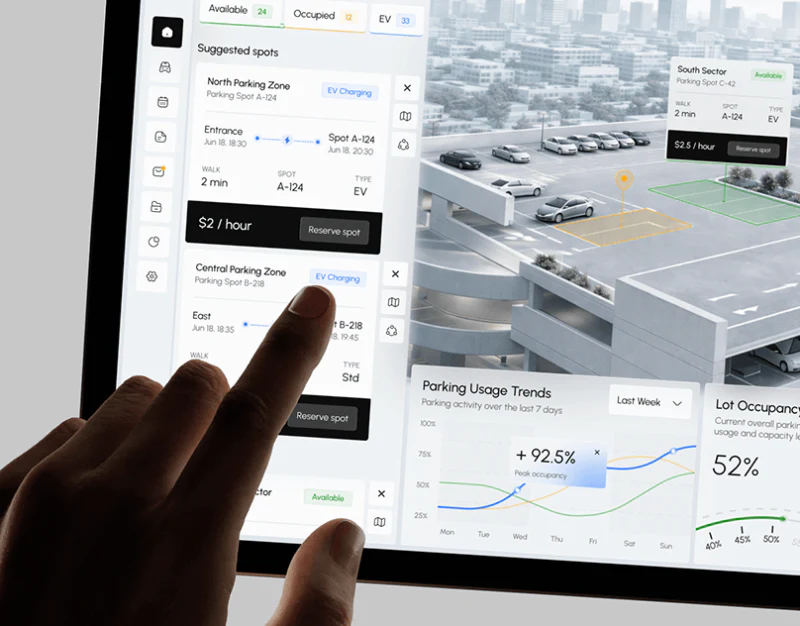
Voltera combines parking-condition cards, vehicle scenes, and charging charts in white interfaces. People and cars convey use context; area, spot number, walking time, type, and cost support selection. Choosing a spot and current charging need continuity while retaining distinct states.
Key takeaways
- Condition cards support spot comparison; vehicle scenes add use context.
- Candidate spots and current sessions need distinct identities and actions.
Spot cards provide comparable conditions
Parking Status Overview places totals above Suggested spots, which list area, entry, spot, walking time, and type. A black bottom bar groups hourly price and Reserve spot, creating a clear action area within pale cards.
This supports comparison field by field, with numbers near locations and costs near reservations. Available and Occupied describe usage states; EV describes facilities. Three adjacent totals need their statistical relationship explained so charging capability and vacancy are not read as mutually exclusive categories.
A person photograph creates a relaxed atmosphere, but choice still depends on fields. Floors, opening times, or vehicle suitability should appear where they affect decisions rather than being inferred from car photographs.

The active session needs a definite identity
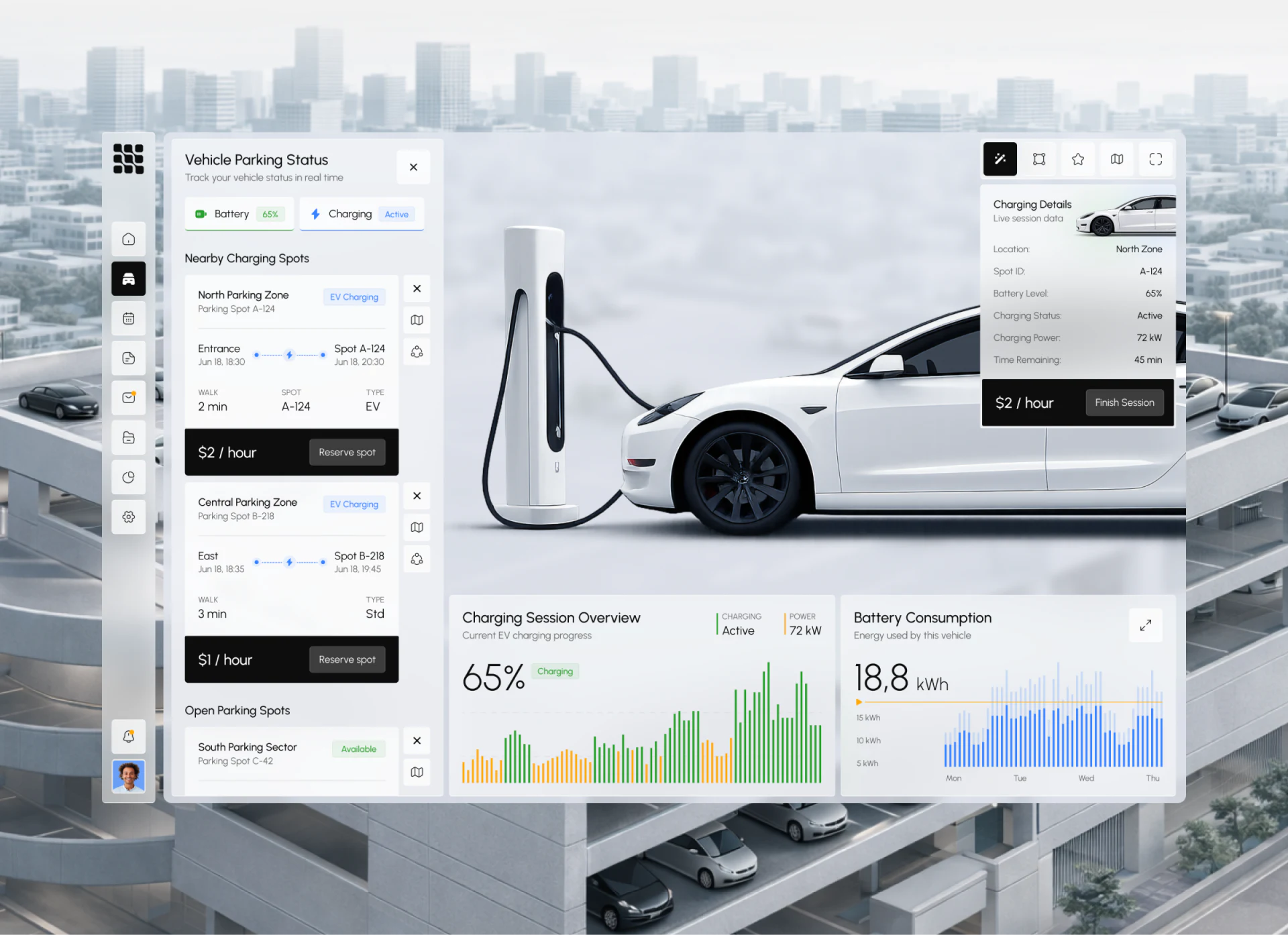
The desktop center shows a vehicle and charger, with nearby spots on the left, Charging Details upper right, and charging and battery charts below. The scene identifies the activity, while white overlays lift comparable data from the background.
Details and candidates both use spot numbers. If one number already belongs to an active charging session, Reserve spot on its left card should match that state or explain that it is simply the current selection. Otherwise candidate and occupied objects can become confused.
Hourly rate and accumulated cost also need separation. Near ending a session, show elapsed time, current charges, and billing scope, especially when parking and charging have separate fees. The example does not establish billing rules; these fields remain planning suggestions.
Mobile emphasizes session progress
Charging Session Overview on mobile retains Active, power, and a large 65%, with green and yellow bars showing a process. A few key values in one card suit checking session status after opening the phone without revisiting the entire parking list.
The percentage needs to identify battery level or session progress, and bars need color and time-range explanations. Update time and interrupted-data states are especially useful: an old value labeled Active can appear current.
The other half contains a personal quote, a brand statement serving a different task from the status card. Praise does not establish session accuracy or reliable operations. JVDS values consistent fields from the current vehicle through ending the session and confirming fees.

Frequently asked questions
Can a 3D vehicle image replace spot location information?
It can assist orientation only when accurately linked to entries, floors, and numbers. A vehicle scene mainly identifies the session; spot selection still needs location and condition fields.
What should be confirmed before ending charging?
Vehicle, spot, elapsed time, fees, and the scope of ending. If parking is billed separately, explain what continues after charging stops.
Design review checklist
- Define spot states separately from facility types.
- Align candidate-card actions with the current session.
- Give status cards units, time, and update explanations.
Connect spot selection with charging status
Parking or charging services can first organize candidates, current sessions, and settlement, then arrange desktop and mobile information.
JVDS Design Studio provides UI/UX design, website design, and development services, helping organize page content, interface structure, and implementation needs.
 Link copied